Features
KeePass features (detailed)
Version tags show where behavior differs: 1.x and 2.x.
On this page
Strong Security
- KeePass supports the Advanced Encryption Standard (AES, Rijndael), ChaCha20 and Twofish for encrypting password databases. These well-known algorithms are considered very secure. AES (Rijndael) is a U.S. federal government standard and is approved by the National Security Agency (NSA) for top secret information.
- The complete database is encrypted, not only the password fields - user names, notes, and other fields are encrypted too.
- SHA-256 hashes master key components. SHA-256 is a 256-bit cryptographically secure one-way hash; the output is transformed using a key derivation function.
- Protection against dictionary and guessing attacks: transforming the master key hash with a key derivation function (AES-KDF, Argon2, …) makes attacks harder.
- Process memory protection: passwords stay encrypted while KeePass is running, so OS dumps of the process do not expose them in plain text.
- 2.x Protected in-memory streams: when loading the inner XML format, passwords are encrypted using a session key.
- Security-enhanced password edit controls: passwords entered there are not visible even in KeePass process memory; common password-control spies do not work against them.
- KeePass can optionally block certain screen captures.
- 2.x The master key dialog can appear on a secure desktop where almost no keylogger works; Auto-Type can be hardened against keyloggers too.
Multiple User Keys
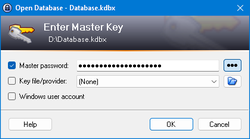
- One master password decrypts the entire database.
- Alternatively you can use key files - often stronger than a password alone. Carry the key file on a USB stick or other media (and do not lose it).
- For more security, combine password + key file: both are required to unlock. If you lose the key file, the database can still remain secure because of the password.
- 2.x You can lock the database to the current Windows user account so only that user can open it.
Portable and No Installation Required, Accessibility
- KeePass is portable: run it from a USB stick on Windows without installing.
- Installer packages are available if you prefer Start menu and desktop shortcuts.
- KeePass leaves little footprint: no new registry keys and no INI files in the Windows directory for the portable ZIP; uninstall or delete the folder to remove traces.
- Community ports exist for Android, iOS, and other platforms (see the Downloads area of your chosen edition).
- 2.x Accessibility: UI can be tuned for screen readers.
Export To TXT, HTML, XML and CSV Files
- Export the password list to TXT, HTML, XML, or CSV.
- XML is easy to consume from other applications.
- HTML output uses CSS so you can restyle the layout.
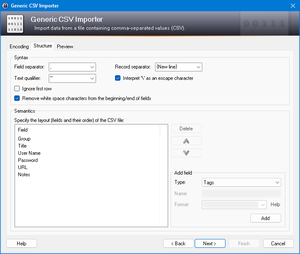
- CSV works with many other password safes and spreadsheet tools (Excel, Calc, …).
- More formats are available through plugins.
Import From Many File Formats
- CSV exports from common password safes (e.g. Password Keeper, Password Agent) import cleanly.
- TXT exports from CodeWalletPro can be parsed.
- TXT files from Bruce Schneier’s Password Safe v2 are supported.
- 2.x Built-in support for importing more than 35 formats out of the box.
- Plugins extend import coverage further.
Easy Database Transfer
- A password database is a single file - easy to copy between machines or back up.
Support of Password Groups
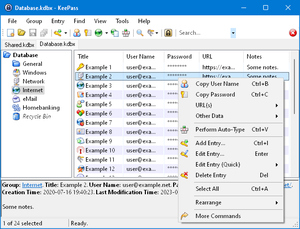
- Create, edit, and delete groups to organize entries.
- Groups form a tree: groups, subgroups, and deeper nesting as needed.
Time Fields and Entry Attachments
- Time fields include creation, last modification, last access, and expiration.
- Attach files to entries (for example PGP signature material).
- 2.x Built-in viewer/editor for text, images, and documents - no export required to preview (review security guidance before editing sensitive attachments).
Auto-Type, Global Auto-Type Hot Key and Drag&Drop
- KeePass can minimize and type the selected entry’s fields into dialogs and web forms; the typing sequence is fully customizable.
- Global Auto-Type hotkey: with a database open in the background, press the hotkey to find the matching entry and run its sequence.
- Title, username, password, URL, and notes support drag-and-drop into other windows.
Intuitive and Secure Windows Clipboard Handling
- Double-click a field in the entry list to copy it to the clipboard.
- Timed clipboard clearing can erase the clipboard automatically after copies.
Searching and Sorting
- Search for specific entries across the database.
- Sort any group by clicking column headers in the entry list.
Multi-Language Support
- KeePass is designed to be translated easily.
- Over 45 languages are available for the UI.
Strong Random Password Generator
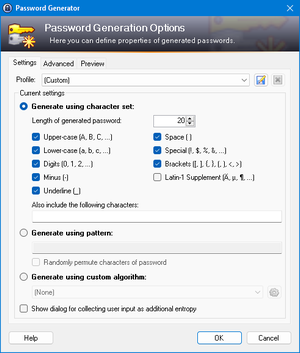
- Generate strong random passwords with configurable character sets and length.
- Random seeding can incorporate mouse movement and keyboard input.
Plugin Architecture
- Third parties can write plugins to extend KeePass.
- Typical extensions add import/export formats, backups, integrations, and UI tools.
- Always verify publishers and checksums before installing plugins in production.
Open Source!
- KeePass is free and you have full access to its source code.
- Open source reduces "trust me" risk: you can review and build from source.
- Open sources encourage ports to other platforms and community translations.
- KeePass is OSI Certified Open Source Software.